Woocaza: The Perfect Display Font for Handmade Crafts
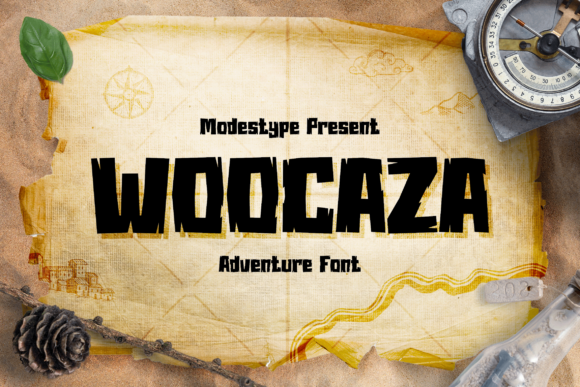
When you are running a handmade business or creating digital downloads, the right display font can be the difference between a project that feels amateurish and one that looks professionally crafted. I have spent years testing typefaces on everything from candle labels to wedding invitations, and there is something special about Woocaza. It is a cool, rough textured and fun looking display font that brings an immediate sense of personality to any design. Whether you are making SVG files for Cricut users, designing printable wall art, or creating stickers for your Etsy shop, this typeface offers a unique charm that stands out in a crowded marketplace.
Why Woocaza Fits Your Creative Projects
The visual personality of Woocaza is distinctively playful yet grounded. Unlike standard geometric sans serif fonts that can feel cold or corporate, Woocaza has a rough texture that suggests hand-drawn origins while maintaining clean lines. This makes it incredibly versatile for cartoon-related designs, school projects, or kids' designs, but its appeal extends far beyond just children's products. For the crafter who wants to add a touch of whimsy without sacrificing readability, this creative font is a game-changer.
I often find myself reaching for Woocaza when I need a title that pops. Its bold presence works beautifully for short phrases, names, titles, and decorative wording. When you are designing product packaging or tags, having a font that captures attention instantly is crucial. The rough edges give it a rustic, artisanal feel that pairs perfectly with farmhouse signs, boutique tags, and holiday product packaging. It feels like it was made by hand, which resonates deeply with customers who value authenticity in their purchases.
Practical Applications for Physical Products
One of the most common questions I get from fellow sellers is how to choose a font that translates well from screen to physical product. Woocaza excels in this area because of its strong character and clear structure. Here are some specific ways I use this commercial font in my own production:
- Product Labels and Stickers: When designing labels for soy candles, soaps, or bath bombs, Woocaza provides a fun backdrop that doesn't overwhelm the ingredient list. You can use it for the brand name in large letters, then switch to a simple sans serif font for the details.
- Greeting Cards and Invitations: For birthday invitations or baby shower cards, the rough texture adds a tactile quality to the digital file. It sets a joyful tone immediately, making the recipient feel excited before they even open the card.
- Mugs, Shirts, and Tote Bags: If you are selling merchandise via print-on-demand or direct printing, Woocaza renders clearly at various sizes. It works exceptionally well for slogan-based tees or personalized tote bags where a fun, slightly imperfect look is desired.
- Wall Art and Printables: In the world of digital printables, Woocaza creates instant focal points. Whether it is a nursery quote, a motivational poster, or a seasonal greeting, this premium font ensures your design looks polished and intentional.
- Wedding Stationery: While often associated with kids' themes, Woocaza can be used for modern weddings with a quirky or bohemian vibe. Imagine a welcome board for a backyard ceremony or a table number set with a playful edge.
Readability and Technical Considerations
As a maker, I know that aesthetics must not come at the cost of functionality. A beautiful font that cannot be read is useless for product design. Woocaza strikes an excellent balance between style and legibility. However, because it is a display font with texture, it requires careful placement. For small stickers or tiny product labels, I recommend using the font for headlines only and pairing it with a highly readable body text.
If you are cutting vinyl for signs or creating SVG-style designs for laser cutting, the rough texture might require some tweaking depending on the machine settings. Always test cut a sample before running a full batch. When previewing mockups for your online store, ensure the resolution is high enough to show off the texture without pixelating. Customers appreciate seeing the detail, and Woocaza delivers that depth effectively in both digital and print formats.
Mastering Font Pairing for Brand Identity
To create a cohesive brand identity, you rarely rely on a single font family. The key to professional-looking designs is font pairing. Woocaza acts as the star of the show, so it needs supporting actors that let it shine. I frequently pair Woocaza with a clean sans serif font for secondary information. The contrast between the rough, fun display text and the crisp, modern sans serif creates a dynamic visual hierarchy that guides the customer's eye.
For a softer, more romantic approach, especially in stationery or wedding contexts, try pairing Woocaza with a flowing script font or a handwritten font. The combination of the structured, textured display letters with the fluidity of a script can create a delightful juxtaposition. Just be careful not to overdo it; limit yourself to two or three typefaces per project to maintain clarity. If you are working on web design or social media graphics, these combinations work wonders for engagement.
Licensing and Commercial Use
Before you start downloading and selling your creations, it is vital to understand the licensing terms. Most high-quality design assets come with specific rules regarding commercial use. Woocaza is designed for both personal and commercial projects, allowing you to sell physical products like mugs, shirts, and stickers, as well as digital downloads such as templates and SVG files. However, always double-check the specific license agreement provided with the font download.
Typically, a standard commercial license allows you to use the font in end-products that you sell, but you cannot resell the font file itself. This means you can put Woocaza on a shirt and sell that shirt, but you cannot package the font file and sell it as a standalone product. Understanding these nuances protects your business and ensures you remain compliant with intellectual property laws. Many creators overlook this step, leading to potential legal issues down the line.
Exploring Styles and Features
When you install Woocaza, take the time to explore all the included styles, alternates, ligatures, and swashes if available. These hidden gems can elevate your designs from generic to custom-made. Alternates might offer different letter shapes that fit better in specific words, while swashes can add extra flair to initials or headings. Checking multilingual support is also a smart move if you plan to reach a global audience or create content in different languages.
The versatility of Woocaza lies in its ability to adapt to various creative needs. Whether you are crafting a school project, designing a logo for a new startup, or creating a complete brand identity for a boutique, this modern typography option offers the flexibility you need. It brings a sense of fun and creativity that is hard to replicate with standard system fonts.
Ultimately, the success of your craft business often comes down to the details. Choosing a font like Woocaza shows that you care about the visual experience of your customer. It communicates quality, thoughtfulness, and a bit of soul. By integrating this creative font into your labels, invitations, signs, and digital templates, you are not just adding text; you are building an emotional connection with your buyers. So, fire up your design software, grab your cutting machine, and let Woocaza bring your next handmade project to life.